Verifying Vapi webhooks in Node.js: X-Vapi-Secret, Bearer tokens and HMAC signatures
How to check that a request to your Vapi server URL really came from Vapi: the legacy X-Vapi-Secret header, Bearer token credentials, and HMAC signatures over the timestamp and body. Tested Node.js with constant-time comparison and a replay window, plus the bug that breaks every HMAC check: verifying JSON.stringify(req.body) instead of the raw bytes.
Vapi sends call events (status updates, tool calls, the end-of-call-report with the transcript) to your server URL, and anyone who finds that URL can send fake ones. Vapi gives you three ways to prove a request is real: the legacy X-Vapi-Secret header (a shared secret, still supported for backward compatibility), a Bearer token credential (sent in Authorization by default), and an HMAC credential, where Vapi signs the request with your secret. With HMAC, the credential form’s example uses SHA-256 over {timestamp}.{body}, with the signature in x-signature and the timestamp in x-timestamp. Whichever you use, compare in constant time, and for HMAC, sign the raw request bytes: in my test, verifying JSON.stringify(req.body) failed for a genuine request, because parsing and re-serialising turned 0.10 into 0.1 and é into é.
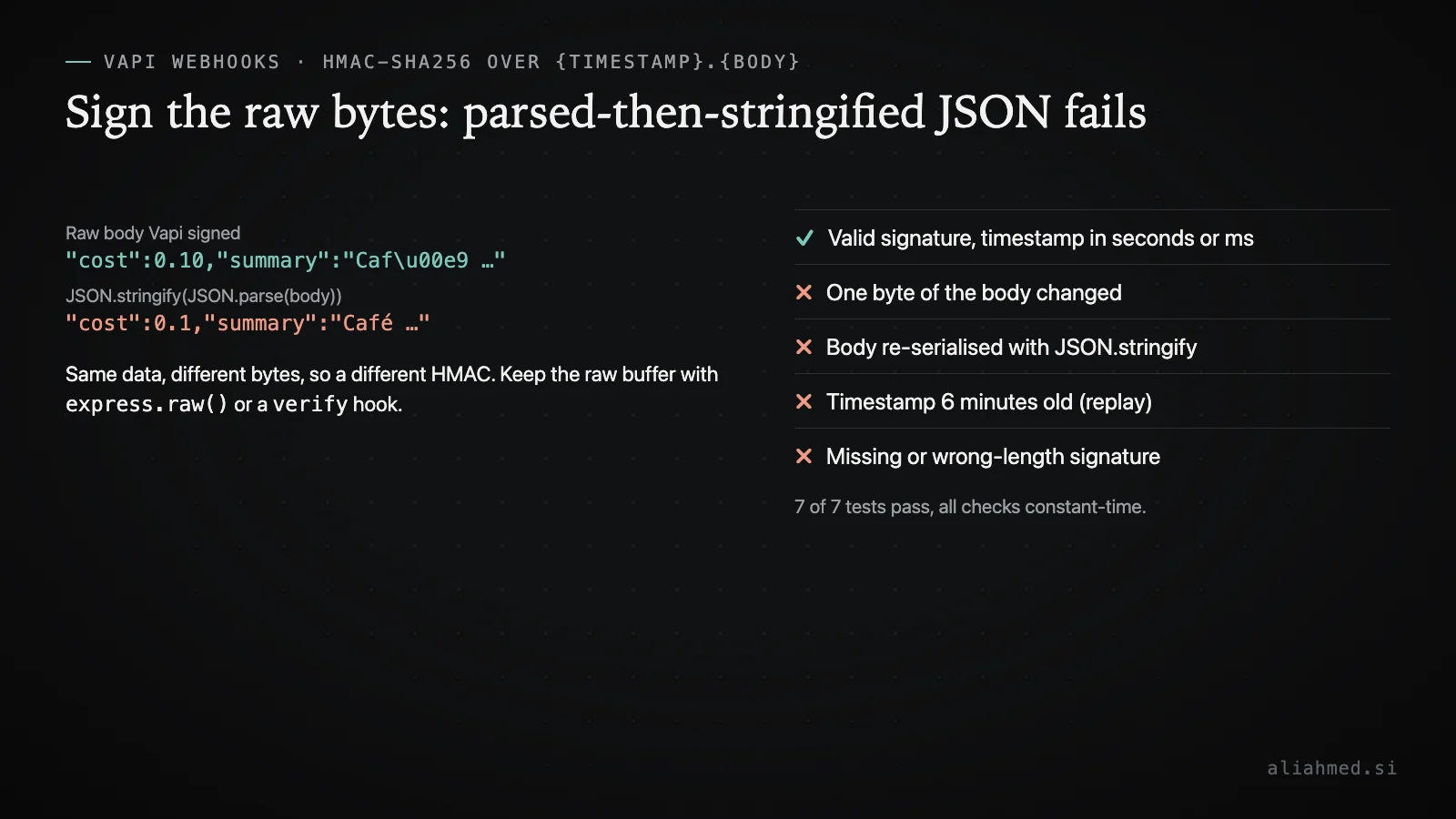
Same data, different bytes: the HMAC only matches the exact body Vapi sent.
Which option should you use?
| Option | What Vapi sends | Protects against | Doesn’t protect against |
|---|---|---|---|
X-Vapi-Secret | Your secret, in that header | Requests from anyone who doesn’t know it | A leaked secret; replayed requests |
| Bearer token credential | Authorization: Bearer <token> by default | Same as above; fits existing auth middleware | Same as above |
| HMAC credential | A signature of the timestamp and body | Forged or altered bodies; with a time window, replays | A leaked signing secret |
The shared-secret options send the secret itself with every request, so anything that logs request headers (a proxy, an APM tool) can leak it. HMAC never sends the secret, and a signature over the body means a captured request can’t be edited. For a new integration, use HMAC. Vapi’s server authentication docs describe all three, and the HMAC form also lets you change the header names, algorithm, payload format and encoding, so match the verifier to what you configured.
The verifier
import { createHmac, timingSafeEqual } from "node:crypto";

const same = (a, b) => {
  const x = Buffer.from(String(a ?? "")),
    y = Buffer.from(String(b));
  return x.length === y.length && timingSafeEqual(x, y);
};

export function verifyVapi(headers, rawBody, cfg, now = Date.now()) {
  const h = Object.fromEntries(Object.entries(headers).map(([k, v]) => [k.toLowerCase(), v]));
  if (cfg.type === "secret") return same(h["x-vapi-secret"], cfg.secret);
  if (cfg.type === "bearer") return same(h["authorization"], `Bearer ${cfg.token}`);
  // HMAC, with the credential form's example settings: x-signature, x-timestamp, "{timestamp}.{body}", hex.
  const ts = h[cfg.timestampHeader ?? "x-timestamp"];
  const sig = String(h[cfg.signatureHeader ?? "x-signature"] ?? "").replace(cfg.prefix ?? "", "");
  if (!ts || !sig) return false;
  const ms = Number(ts) > 1e12 ? Number(ts) : Number(ts) * 1000; // docs don't say seconds or ms
  if (!Number.isFinite(ms) || Math.abs(now - ms) > (cfg.toleranceMs ?? 5 * 60_000)) return false;
  const expected = createHmac(cfg.algorithm ?? "sha256", cfg.secret)
    .update(`${ts}.${rawBody}`)
    .digest(cfg.encoding ?? "hex");
  return same(sig, expected);
}
Three details matter:
timingSafeEqualneeds equal lengths, and throws otherwise. Thesamehelper checks the length first, so a short or missing header returnsfalseinstead of crashing the handler.- The timestamp unit. Vapi’s docs don’t say whether
x-timestampis in seconds or milliseconds, so the verifier accepts both: values above 10¹² are treated as milliseconds. Log one real request and pin it down once you know. - The replay window. A valid signed request captured once stays valid forever unless you reject old timestamps. Five minutes allows for clock drift and retries.
Keeping the raw body in Express
express.json() parses the body and throws the original bytes away. Keep them for the webhook route:
app.post("/webhook/vapi", express.raw({ type: "application/json" }), (req, res) => {
  const raw = req.body.toString("utf8");
  if (!verifyVapi(req.headers, raw, { type: "hmac", secret: process.env.VAPI_WEBHOOK_SECRET })) {
    return res.sendStatus(401);
  }
  const { message } = JSON.parse(raw);
  // handle message.type: "status-update", "tool-calls", "end-of-call-report", ...
  res.sendStatus(200);
});
If the whole app already uses express.json(), its verify option can stash the buffer instead: express.json({ verify: (req, _res, buf) => { req.rawBody = buf } }).
What the tests show
test("re-serialised JSON fails: sign the raw bytes, not JSON.stringify(req.body)", () => {
  const s = Math.floor(now / 1000);
  const reserialised = JSON.stringify(JSON.parse(body));
  assert.notEqual(reserialised, body);
  assert.equal(verifyVapi({ "x-signature": sign(s, body), "x-timestamp": String(s) }, reserialised, hmac, now), false);
});
Seven tests, all passing:
- A valid signature passes, with the timestamp in seconds or milliseconds, and with header names in any case.
- One changed byte (
0.10to0.01) fails. - The re-serialised body fails:
"cost":0.10,"summary":"Café booking"comes back as"cost":0.1,"summary":"Café booking". Same data, different bytes. - A timestamp 6 minutes old fails.
- A missing or wrong-length signature fails without throwing.
- A GitHub-style
sha256=prefix with base64 encoding works when configured. X-Vapi-Secretand Bearer modes accept the right value and reject a wrong or missing one.
After verification
Verification proves the request came from Vapi. It doesn’t stop Vapi from sending the same event twice: retries and multiple events per call are normal. Store events idempotently and make side effects like emails happen once; how HI Agent’s backend handles Vapi webhooks shows that in a real voice agent, and idempotent webhooks in Node.js covers the pattern in general. For tool calls, the response time matters too: see tool call latency in voice AI agents.
Summary
- Vapi offers
X-Vapi-Secret, Bearer token and HMAC authentication; prefer HMAC for new integrations. - HMAC is computed over
{timestamp}.{body}in the credential form’s example; match the verifier to your credential’s settings. - Verify the raw bytes: in the test, re-serialised JSON failed for a genuine request.
- Compare in constant time, check lengths first, and reject timestamps older than 5 minutes.
- Verification doesn’t make handling idempotent: deduplicate events too.
For the general pattern, including accepting two secrets while you rotate one, see verifying webhook signatures in Node.js.
Part of the guide AI agents: tool calling, MCP and security, which puts related articles in reading order.