Keeping a scraper from overwriting human edits: field locks and edit history
When a pipeline re-scrapes data that people also correct, the scraper must never undo their fixes. Record every change with who made it, lock a field when a person edits it, skip locked fields on refresh, and check the lock inside the write itself. Tested in Node.js, including the race where an edit made during a slow scrape is lost.
A research pipeline that scrapes company websites and lets people correct the results has a simple rule to keep: people win over robots. When a person edits a field, save the change in an edit history with who made it, and add the field to the record’s locked fields. When the scraper refreshes the record, it skips locked fields and writes the rest. Automated writes are recorded too, but they never lock anything, and saving a value that hasn’t changed does nothing at all. In my tests that keeps a corrected website URL through every re-scrape, with the history showing exactly who changed what. One gap remains: if the scraper reads the locks, spends seconds fetching pages, then writes, a person’s edit made in between is overwritten. The fix is to check the lock inside the write, in the same database operation.
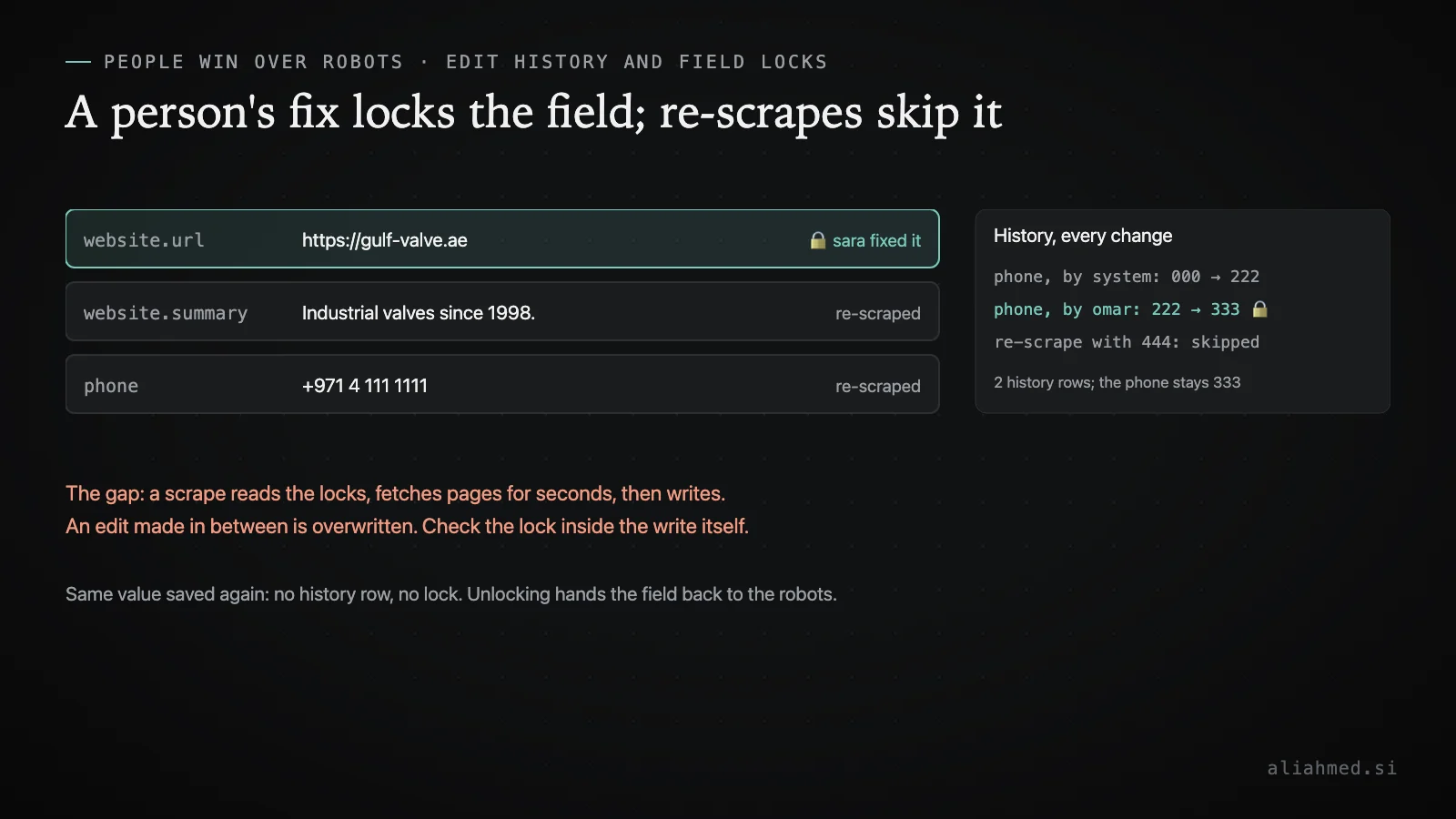
Locks protect the fields people touched; history explains every value.
This is how the ADIPEC lead-research backend I built handles corrections: its saveWithHistory logs the old value, locks the field, and the website step skips locked fields. Below is the same logic in plain JavaScript with the tests.
The two functions
export function saveWithHistory(doc, changes, by, history, { lock = true } = {}) {
  const changed = Object.entries(changes).filter(([k, v]) => !same(get(doc, k), v));
  for (const [field, after] of changed) {
    history.push({ field, before: get(doc, field), after, by, at: history.length + 1 });
    set(doc, field, after);
    if (lock && by !== "system" && !doc.lockedFields.includes(field)) doc.lockedFields.push(field);
  }
  return changed.map(([k]) => k);
}

// What a re-scrape does: write everything it found, except fields a person has locked.
export function applyScrape(doc, scraped, history) {
  const allowed = Object.fromEntries(Object.entries(scraped).filter(([k]) => !doc.lockedFields.includes(k)));
  return saveWithHistory(doc, allowed, "system", history);
}
get, set and same are three-line helpers for dotted paths (website.url) and value comparison. Fields are locked individually: correcting the URL doesn’t stop the scraper from refreshing the summary.
What the tests show
Five tests, all passing:
- A re-scrape never overwrites a person’s fix. Sara corrects
website.url; the next scrape brings the wrong URL back, plus a new summary and phone. It writeswebsite.summaryandphone, and skipswebsite.url. - History has every change and who made it.
system: 000 → 222, thenomar@team: 222 → 333. The next scrape’s444is skipped: two history rows, and the phone stays333. - Saving the same value is a no-op: no history row, no lock. Otherwise a person opening and saving a form would lock every field on it.
- Unlocking hands the field back. After
unlock(doc, "phone"), the next scrape updates the phone again. - The gap. The scrape job reads the record and its locks, then Sara edits
website.summary, then the job writes using the locks it read earlier. Its write goes through, and Sara’s edit is lost.
Closing the gap
The lock check has to happen at the moment of the write, not when the job started:
- Per-field conditional write. In MongoDB, write each field with a filter that excludes locked ones:
updateOne({ _id, lockedFields: { $ne: "website.summary" } }, { $set: { "website.summary": text } }). If someone locked the field meanwhile, the filter matches nothing and the scrape’s value is dropped. In SQL, the same withWHERE NOT locked_summary. - Version check. Read a version number with the record, and write only if it hasn’t changed (
WHERE version = $read); on a conflict, re-read the locks and retry. It’s the same optimistic concurrency used for multi-step approvals.
Either way, the scraper’s slow part (fetching pages) stays outside the write, and the decision “is this field locked?” is made with current data.
Design choices that matter
- Automated writes are recorded but don’t lock. Otherwise the first scrape would lock everything and nothing would ever refresh.
- Lock per field, not per record. People correct one wrong value; the rest should keep updating.
- Show locks in the interface, with an unlock action. A locked field nobody can see is a field that silently never updates again.
- Keep history append-only. It’s the answer to “why does this say that?”, and it’s what makes undo possible.
Summary
- Record every change with who made it; lock fields people edit; skip locked fields on refresh.
- System writes don’t lock, and unchanged values don’t count as edits.
- A scraper that checks locks before a slow fetch can overwrite an edit made during it: check the lock inside the write.
- Show and allow unlocking, so corrected fields can rejoin the refresh.
The same pipeline flags likely duplicate companies for people to decide on: detecting duplicate companies by domain and name. For an append-only log that can prove it hasn’t been edited, see hash-chained audit logs.
Part of the guide Reliable backends in Node.js, Python and Go, which puts related articles in reading order.