SSRF protection for server-side fetch in Node.js: block private addresses at connect time, on every redirect
How to fetch user-supplied URLs from Node.js without letting them reach localhost, cloud metadata or your internal network: parse first, block private and IPv4-mapped addresses, check DNS results at connect time to stop rebinding, and follow redirects manually so every hop is checked. Tested with undici, including five spellings of 127.0.0.1 and the BlockList rule that blocks every public IPv4 address.
What the video shows
Four URLs appear one by one: http://2130706433/, http://0x7f.0.0.1/, http://127.1/ and http://0177.0.0.1/. Each one, parsed with new URL(), becomes 127.0.0.1, and all four are refused. Next, three boxes: your server, a public site that answers with a 302 redirect to 127.0.0.1, and an internal service on 127.0.0.1:8080. With a plain fetch, the request goes to the public site, follows the redirect to the internal service, and a SECRET comes back. With the guard, the redirect is checked before it is followed: Refused, private address 127.0.0.1. Then the hostname localhost resolves to ::1 and 127.0.0.1; the lookup hook sees the private address and refuses the connection, which also stops DNS rebinding. The closing card: parse, check literals, check DNS at connect, and with redirect set to manual, repeat for every hop.
Server-side request forgery (SSRF) happens when your server fetches a URL someone else chose, and that URL points somewhere only your server can reach: localhost, a database, the cloud metadata service at 169.254.169.254, or another machine on the internal network. Checking the URL string isn’t enough, because 2130706433, 0x7f.0.0.1, 127.1 and 0177.0.0.1 are all 127.0.0.1, and a harmless-looking hostname can resolve to a private address. The fix that holds up: parse the URL first, refuse private and reserved addresses including IPv4-mapped IPv6, check the address DNS actually returned at connect time (which also stops DNS rebinding), and set redirect: "manual" so every redirect hop goes through the same checks. In my test, a plain fetch followed a public page’s redirect and read “SECRET from 127.0.0.1”; the guarded version refused it. One trap along the way: adding ::ffff:0:0/96 to Node’s BlockList blocks every IPv4 address, including 8.8.8.8.
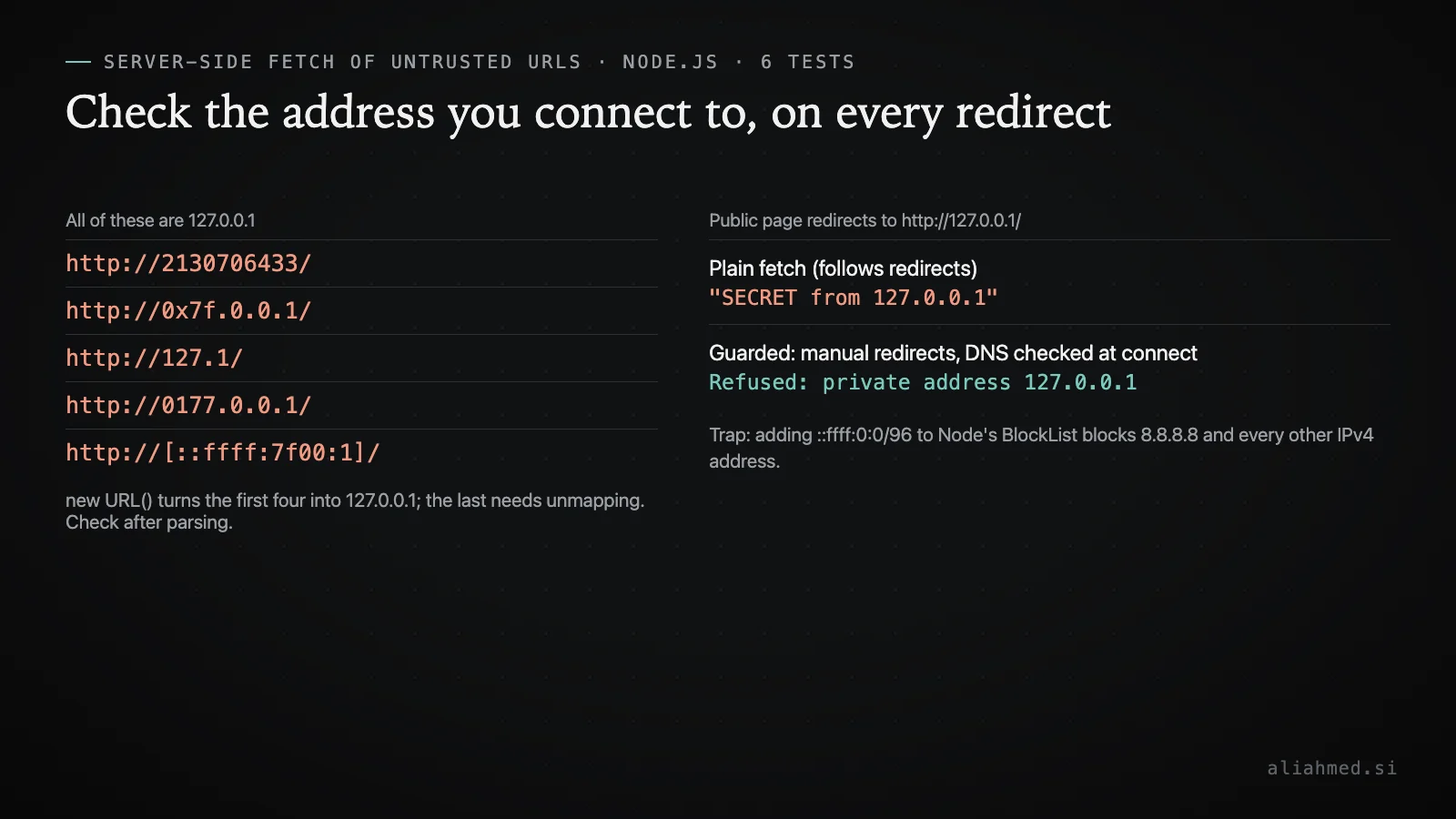
Check the parsed address, then the resolved address, then every redirect.
This is the guard from a lead-research pipeline I built, which reads exhibitor websites listed on a trade-show directory: the URLs come from a third party, so each one is treated as hostile. The version below is trimmed from that code and tested on its own.
Which addresses should be blocked?
| Range | What’s there |
|---|---|
127.0.0.0/8, ::1 | Loopback: services bound to localhost |
10.0.0.0/8, 172.16.0.0/12, 192.168.0.0/16, fc00::/7 | Private networks |
169.254.0.0/16, fe80::/10 | Link-local, including cloud metadata endpoints |
100.64.0.0/10 | Carrier-grade NAT, used inside some clouds |
0.0.0.0/8, :: | “This host”: often reaches localhost |
192.0.0.0/24, 198.18.0.0/15, 224.0.0.0/4, 240.0.0.0/4 | Reserved, benchmarking, multicast |
Where does each check run?
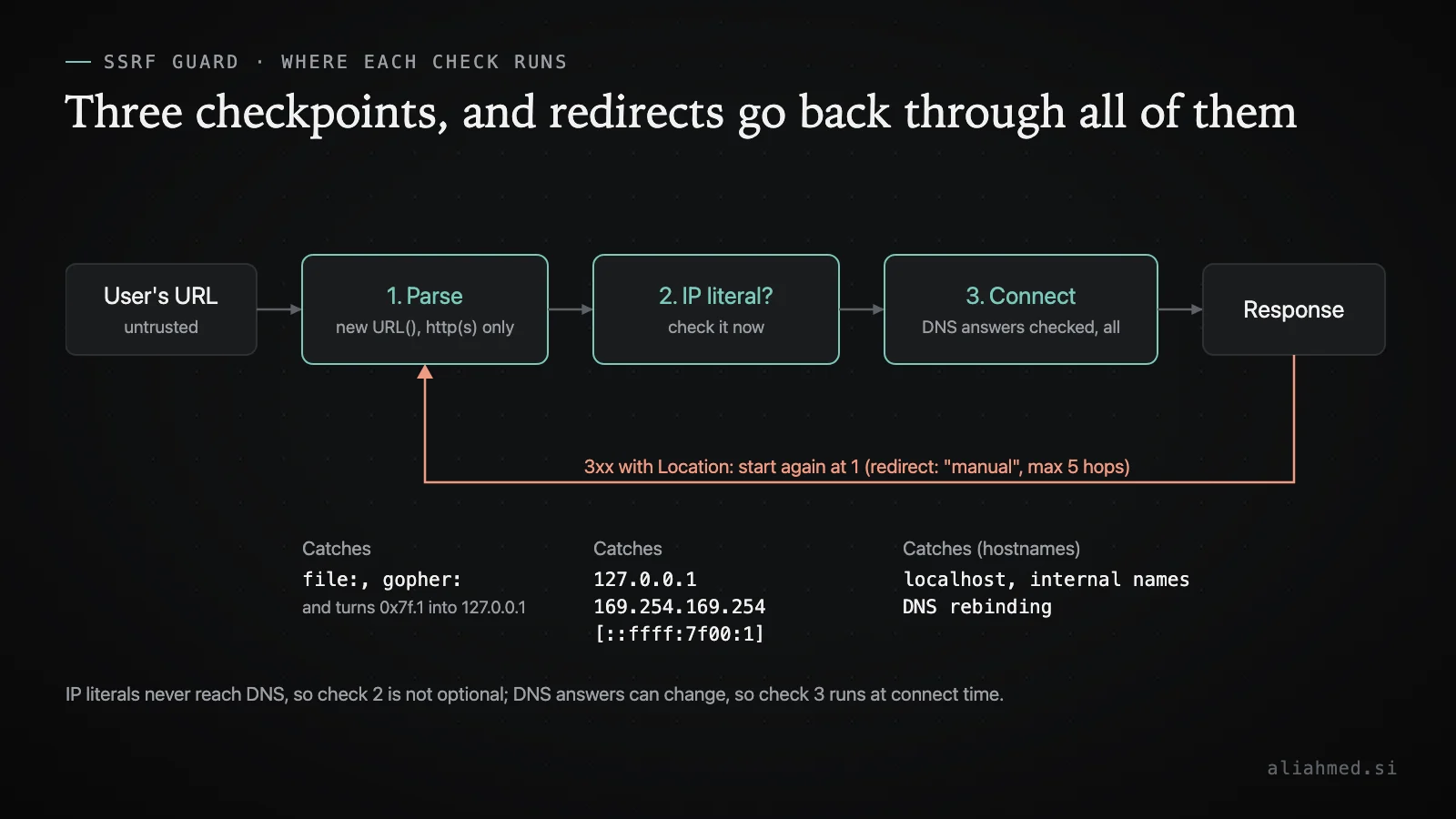
Each checkpoint catches what the one before can’t see.
The guard
const blocked = new net.BlockList();
for (const [a, p] of [
  ["0.0.0.0", 8],
  ["10.0.0.0", 8],
  ["100.64.0.0", 10],
  ["127.0.0.0", 8],
  ["169.254.0.0", 16],
  ["172.16.0.0", 12],
  ["192.0.0.0", 24],
  ["192.168.0.0", 16],
  ["198.18.0.0", 15],
  ["224.0.0.0", 4],
  ["240.0.0.0", 4],
])
  blocked.addSubnet(a, p, "ipv4");
for (const [a, p] of [
  ["::", 128],
  ["::1", 128],
  ["fc00::", 7],
  ["fe80::", 10],
])
  blocked.addSubnet(a, p, "ipv6");

function unmapIpv4(ip) {
  const canonical = new URL(`http://[${ip}]`).hostname.slice(1, -1); // normalises ::ffff:127.0.0.1 to ::ffff:7f00:1
  const m = canonical.match(/^::ffff:([0-9a-f]{1,4}):([0-9a-f]{1,4})$/i);
  if (!m) return undefined;
  const [hi, lo] = [parseInt(m[1], 16), parseInt(m[2], 16)];
  return [hi >> 8, hi & 255, lo >> 8, lo & 255].join(".");
}

export function isPrivateIp(ip) {
  if (allow.has(ip)) return false;
  if (net.isIPv6(ip)) {
    const v4 = unmapIpv4(ip);
    return v4 ? isPrivateIp(v4) : blocked.check(ip, "ipv6");
  }
  return blocked.check(ip, "ipv4");
}
The obvious way to block IPv4-mapped addresses is to add ::ffff:0:0/96 to the list. Don’t:
const b = new net.BlockList();
b.addSubnet("::ffff:0:0", 96, "ipv6");
b.check("8.8.8.8", "ipv4"); // true
b.check("1.1.1.1", "ipv4"); // true
Node’s BlockList also matches IPv4 addresses against IPv4-mapped IPv6 rules, so that one rule blocks the whole internet. Unwrap mapped addresses and check them as IPv4 instead, as isPrivateIp does.
export function checkUrl(raw) {
  const u = new URL(raw); // WHATWG parsing turns 2130706433, 0x7f.1 and 127.1 into 127.0.0.1
  if (u.protocol !== "http:" && u.protocol !== "https:") throw new Refused(`scheme ${u.protocol}`);
  const host = u.hostname.replace(/^\[|\]$/g, "");
  if (net.isIP(host) && isPrivateIp(host)) throw new Refused(`private address ${host}`);
  return u;
}

// Hostnames are checked after DNS, at connect time: this is what stops DNS rebinding.
export const agent = new Agent({
  connect: {
    lookup(hostname, options, cb) {
      dns.lookup(hostname, { ...options, all: true }, (err, list) => {
        if (err) return cb(err);
        const bad = list.find((a) => isPrivateIp(a.address));
        if (bad) return cb(new Refused(`${hostname} resolves to ${bad.address}`));
        return options.all ? cb(null, list) : cb(null, list[0].address, list[0].family);
      });
    },
  },
});

export async function safeFetch(raw, { maxRedirects = 5 } = {}) {
  let url = checkUrl(raw);
  for (let hop = 0; ; hop++) {
    let res;
    try {
      res = await fetch(url, { dispatcher: agent, redirect: "manual", signal: AbortSignal.timeout(15_000) });
    } catch (e) {
      throw e?.cause instanceof Refused ? e.cause : e;
    }
    const loc = res.status >= 300 && res.status < 400 && res.headers.get("location");
    if (!loc) return res;
    await res.body?.cancel();
    if (hop >= maxRedirects) throw new Refused("too many redirects");
    url = checkUrl(new URL(loc, url).href); // every hop is checked again
  }
}
Three details carry the weight:
- The lookup hook runs at connect time. Checking DNS yourself and then letting
fetchresolve again leaves a gap: a hostname can answer with a public address for your check and a private one for the connection (DNS rebinding). Checking inside the connection’s own lookup closes it. - Every address is checked, not just the first.
localhostusually resolves to both::1and127.0.0.1; one bad answer refuses the whole request. - IP literals skip DNS, so the lookup hook never sees them. That’s why
checkUrlchecks literal addresses itself, and why redirects must be followed manually: a redirect tohttp://127.0.0.1/is a literal too.
fetch here is undici’s (npm i undici), because Node’s built-in fetch takes a dispatcher only from the undici package.
What the tests show
The test runs two local servers: an internal one on 127.0.0.1 that returns a secret, and a “public” one on ::1 (allowed only in the test) that redirects to it. Six tests pass:
- Tricky spellings refused:
2130706433,0x7f.0.0.1,127.1,0177.0.0.1,[::ffff:127.0.0.1],[::ffff:7f00:1],169.254.169.254,[fd00::1],0.0.0.0, plusfile:andgopher:URLs.new URL()normalised the first four to127.0.0.1. - Public addresses pass:
8.8.8.8,2606:4700:4700::1111and::ffff:8.8.8.8. - The BlockList trap is real: with
::ffff:0:0/96added,8.8.8.8and1.1.1.1are blocked. localhostis refused at connect time, by the DNS check.- Redirects into private addresses are refused, both to
127.0.0.1and tolocalhost; a normal page on the allowed host still loads. - Without the guard, undici’s default
fetchfollowed the same redirect and returned"SECRET from 127.0.0.1".
What else to put around it
- Timeouts and size limits: 15 seconds and a few megabytes, so a slow or huge response can’t tie up workers.
- No credentials: never forward cookies or auth headers to a user-chosen URL.
- Egress rules: if the platform allows it, a network policy or proxy that only permits outbound internet traffic is a second layer that doesn’t depend on this code.
- For AI agents too: a “fetch this URL” tool is the same risk with an LLM choosing the URL, and prompt injection in scraped data is how an attacker gets to choose it. Localhost is not authentication covers the service side: anything listening on loopback should still check who’s calling.
Summary
- Parse with
new URL()first;2130706433and127.1are127.0.0.1. - Block private, link-local and reserved ranges, and unwrap IPv4-mapped IPv6. Don’t add
::ffff:0:0/96to aBlockList: it blocks every IPv4 address. - Check resolved addresses at connect time, all of them, to stop DNS rebinding.
- Use
redirect: "manual"and check every hop; in the test, a plainfetchread the internal secret through one redirect.
For checking what users upload rather than what you fetch, see validating file uploads by magic bytes.
Part of the guide Reliable backends in Node.js, Python and Go, which puts related articles in reading order.